|
|

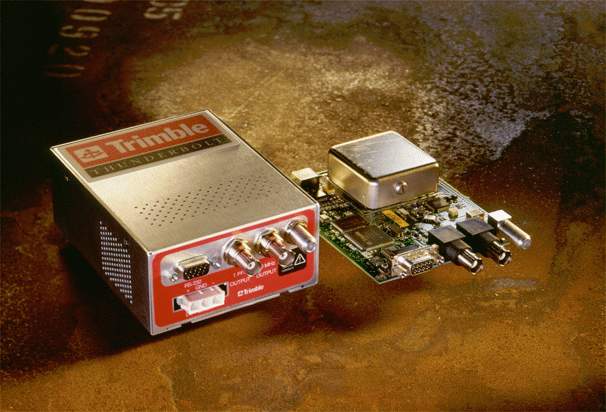
1. Synopsis
Name: trimble
Reference ID: GPS
Serial Port: /dev/trimbleu; 9600/38400 bps 8N1/8O1
2. Description
The refclock trimble driver version 4.01 supports Trimble Navigation’s Palisade Smart Antenna GPS receiver, Thunderbolt, Acutime 2000, Acutime Gold, Resolution SMT, ACE III and Copernicus II. The EndRun Technologies Praecis Cf, Ct, Ce, and II modules (in Palisade emulation mode) are also supported.
There are a number of different Trimble receivers with "Resolution" as part of their name. The particular receiver supported by this driver is the "Resolution SMT", part number 66974-45. This receiver returns hardware code 3009 decimal when queried by a TSIP Hardware Component Information command packet. It may also support the "Resolution T" receiver (hardware code 3002 decimal) but has not been tested on that device.
3. Tested Receivers
Driver version 4.01 has been tested with the following receivers on the four host machines listed in the "Host#" table. All tests are done with minpoll and maxpoll set to 4 (16 seconds).
| Model | FW Ver | Event In? | PPS width |
|---|---|---|---|
ACE III 39818-00-C |
8.08 |
N |
10 us |
Acutime 2000 39091-00 |
2.02 |
Y |
10 us |
Acutime Gold 55238-00 |
1.12 |
Y |
10 us |
Copernicus II 63530-00 |
1.07.1 |
N |
5 us |
Palisade 26664-00 |
7.12 |
Y |
1 us |
Praecis Cf 3001-0000-000 |
2.21 |
Y |
1 ms |
Praecis II 3002-0001-000 |
1.05 |
Y |
1 ms |
Thunderbolt 48051-61 |
3.00 |
N |
10 us |
Resolution SMT 66974-45 |
1.14 |
N |
125 us |
Resolution SMTx 99889-00 |
2.02 |
N |
125 us |
Model Notes:
1. Models without an event input were tested with the
pps driver active.
2. Praecis models tested using a CDMA simulator (refer to the
Praecis notes.)
3. The Resolution SMTx 99889-00 was also available on a carrier board as part
number 66974-75.
| Host# | Machine | Operating System | Serial Port |
|---|---|---|---|
1 |
Dell Precision 7910 |
Gentoo (amd64) |
Onboard,SIIG CyberPro v5 |
2 |
Raspberry Pi 3 B |
Raspberry Pi OS Lite |
Onboard full UART |
3 |
Sun Ultra 5 |
Tribblix m31 SPARC |
Onboard UART |
4 |
Power Mac G4 MDD |
FreeBSD 14.3 |
Startech PCI1S550 |
Host Notes, by Host#:
1. e5-2667v3, motherboard clock replaced with OCXO
2. 32-bit Debian 12, using UART0. 3.3VDC receivers connected directly to GPIO
pins, others connected with a Maxim MAX3232 level converter (the pps-gpio
assert_falling_edge option can be used if an inverter is installed at the
receiver-side level converter)
3. 1GB RAM (FDD removed), Tribblix is an illumos distribution based on SunOS
5.11, onboard UART supports only assert (rising) PPS edge with minimum +V
width of 20 microseconds and minimum off time (at -V) of 0.3 microseconds so
receivers with short PPS widths need a pulse stretcher or inversion and delay
compensation
4. Order# M9309, motherboard clock replaced with OCXO
4. Operating System Serial Port Configuration
The driver attempts to open the device /dev/trimbleu where u is the NTP refclock unit number, or the LSB of the refclock address when using the legacy syntax.
The user must provide a symbolic link to an available serial port device. This is typically performed by a command such as:
| OS | Command |
|---|---|
FreeBSD |
ln -s /dev/ttyu0 /dev/trimble0 |
Linux |
ln -s /dev/ttyS0 /dev/trimble0 |
Solaris |
ln -s /dev/term/a /dev/trimble0 |
Raspberry Pi OS |
ln -s /dev/ttyAMA0 /dev/trimble0 |
The receivers supported by this driver have a factory default serial port configuration of 8O1 (odd parity) except the Thunderbolt and Copernicus II which default to 8N1 (no parity). They have a factory default serial port speed of 9600 baud except the Copernicus II which defaults to 38400 baud. The driver automatically sets the baud rate and parity of the host to match the receiver’s factory default values.
5. NTP Configuration Examples
NTP configuration file "ntp.conf"
refclock trimble unit X subtype Y
or
refclock trimble unit X subtype Y time1 Z.ZZZ
Substituting an appropriate unit number for X. For subtype Y refer to the following subtype table:
| subtype | Model |
|---|---|
0 |
Palisade |
1 |
Praecis |
2 |
Thunderbolt |
3 |
Acutime 2000 & Acutime Gold |
5 |
Resolution SMT |
6 |
ACE III |
7 |
Copernicus II |
|
Note
|
There is currently no difference between subtype 0 and subtype 3 other than the driver startup message. |
Use the time Z.ZZZ option if the delay introduced by decoding of serial messages from the receiver causes the reference clock to appear to be offset compared with other time sources. (If the reference clock appears to have an offset of -50ms for example, set time1 to +0.05.)
6. Initial Setup and Testing for Palisade / Acutime Receivers
-
Read the Palisade / Acutime notes.
-
Place the GPS receiver outdoors, with a clear view of the sky for best results — these receivers do not work well indoors.
-
Power up and allow the receiver to obtain UTC offset data. This can take 13 to 30 minutes with outdoor placement, or up to a few hours indoors.
-
Optionally wait for the receiver to pulse its PPS output. The PPS LED will blink if using an interface module; this indicates that the receiver has entered a state that is usable by the driver.
-
If the PPS is not produced after a few hours: The antenna placement may be suboptimal, the signal level mask values are too high, or PPS was disabled in the receiver. Relocate to a better position, or reset the receiver’s configuration to factory defaults.
-
-
Connect the host to Port A.
-
Configure the serial I/O port and its symbolic link on the host.
-
Add the refclock to your
ntpdconfiguration file withdebuglevel2 on the refclock configuration line. -
Run
ntpdwhile monitoring your system log. -
A line containing TRIMBLE(u) open (with the unit number as u) will appear when the serial port has correctly opened.
-
Lines containing
TSIPwill appear as the driver processes message packets from the receiver.-
Check your serial connection if a line with no packets found appears.
-
If no
TSIPlines are seen within 60s the event triggering method may be incorrect, check yourflag3setting. It’s also possible that the receiver is misconfigured: try resetting it to factory defaults. -
A line with packet(s) found but none were usable. will appear if
flag3is incorrect, or if the host is connected to Port B.
-
-
Lines with
trimble_receivewill appear when operation is correct.-
If
TSIPlines are seen buttrimble_receivenever appears:-
TSIPlines with Tracking n SVs display the number of usable satellites. At least four must be tracking if the receiver does not have a valid stored position, but only one is needed if it does. -
TSIPlines with unusable tracking status will appear if there are insufficient usable satellites.
-
-
-
Once operation appears correct, remove debuglevel 2 from the refclock configuration line and restart.
7. Initial Setup and Testing for Praecis Receivers
-
Read the Praecis notes.
-
Power up and allow the receiver to lock with a cell tower. This can take a few minutes if the unit has been powered on recently and has good reception, but may take much longer with poor reception or if the unit has been powered off for many months.
-
Configure the serial I/O port and its symbolic link on the host.
-
Add the refclock to your
ntpdconfiguration file withdebuglevel2 on the refclock configuration line. -
Run
ntpdwhile monitoring your system log. -
A line containing TRIMBLE(u) open (with the unit number as u) will appear when the serial port has correctly opened.
-
Lines containing
TSIPwill appear as the driver processes message packets from the receiver.-
Check your serial connection if a line with no packets found appears, and ensure that
flag3is not set.
-
-
Lines with
trimble_receivewill appear when operation is correct.-
If the time data has random large offsets the receiver’s CTIME is probably set ON. See the Praecis manual for the command to change this setting.
-
-
Once operation appears correct, remove debuglevel 2 from the refclock configuration line and restart.
8. Initial Setup and Testing for Receivers Without Event Inputs
This section is for the Thunderbolt, Resolution SMT, ACEIII, and Copernicus II receivers.
-
Read the Thunderbolt / Resolution SMT / ACE III / Copernicus II notes.
-
Power up and allow the receiver to obtain UTC offset data. This can take 13 to 30 minutes, or much longer with poor antenna placement.
-
Configure the serial I/O port and its symbolic link on the host.
-
Add the refclock to your
ntpdconfiguration file withdebuglevel2 on the refclock configuration line. -
Run
ntpdwhile monitoring your system log. -
A line containing TRIMBLE(u) open (with the unit number as u) will appear when the serial port has correctly opened.
-
Lines containing
TSIPwill appear as the driver processes message packets from the receiver.-
Check your serial connection if a line with no packets found appears.
-
If a line with packet(s) found but none were usable. appears, the driver may have failed to reconfigure the receiver to transmit auto-report superpackets. Check your serial hardware.
-
-
-
Lines with
trimble_receivewill appear when operation is correct.-
If
TSIPlines are seen buttrimble_receivenever appears:-
TSIPlines with misconfigured will appear if the driver failed to reconfigure the receiver at startup. Verify the receiver subtype is correct. -
For the Thunderbolt:
-
TSIPlines with not in holdover…unusable will appear if there are insufficient usable satellites and the receiver is not in holdover. -
TSIPlines with unit in holdover…exceeds time2 will appear if the unit has been in holdover for more thantime2seconds.
-
-
-
-
Once operation appears correct, remove debuglevel 2 from the refclock configuration line and restart.
9. Event Logging
System log entries generated by the driver during startup will be of the form:
2025-04-02T18:01:49 ntpd[3233]: REFCLOCK: TRIMBLE(0): NOTICE: open at
 /dev/trimble0
|
Note
|
"/dev/trimble0" will appear if the device path is not
specified, otherwise the specified path will appear
|
The driver will not generate system log entries unless the
logconfig clockinfo message class is enabled.
Add the following to your ntpd configuration file to enable all
messages from the driver:
logconfig +clockinfo
Errors and warnings that may prevent normal operation are logged once enabled.
The driver attempts to avoid logging persistent errors more than once an
hour, and persistent warnings more than once a day. Setting
debuglevel to 1 will allow persistent errors and warnings
to repeatedly generate log entries. Setting debuglevel to 2 will additionally
enable informational log entries. A debuglevel of 1 or more should be used
only during setup or troubleshooting due to the large amount of log entries
generated (up to 1 kilobyte per second). Setting debuglevel to 1 or more will
override the logconfig options so driver log entries will always appear.
|
Note
|
Some receivers generate informational messages with location information when debuglevel is 2 or more. To omit the location, add 128 to the debuglevel. |
The debuglevel can be changed while ntpd is running by using the
ntpq utility. Note that ntpkeygen
authentication keys must be present, and the
controlkey and
unrestrict nomodify must be configured.
An example command which changes debuglevel to 2 on unit #0 when the
controlkey is set to 1 is:
ntpq -a 1 -c ":config fudge 127.127.29.0 debuglevel 2"
Note 1: The unit number is the last digit of the IPv4-formatted address.
Note 2: If an ntpq :config command has a syntax error the server may return
the confusing error message of "***Server error code PERMISSION"
The last logged message will appear in ntpq’s logmessage clock variable.
10. Clockstats
Standard-format clockstats file log entries are
generated by the driver once every polling interval by default.
11. Driver Options
|
Note
|
Refer to Reference Clock Options for generic option information. |
unitnumber-
Specifies the receiver number, with default 0. Used as an identifier so that the driver can control multiple receivers.
time1time-
Specifies the time offset calibration factor, in seconds and fraction, with default 0.0.
time2time-
Specifies the holdover duration for Thunderbolt, in seconds, with default 0 (holdover disabled).
stratumnumber-
Specifies the driver stratum, in decimal from 0 to 15, with default 0.
refidstring-
Specifies the driver reference identifier, an ASCII string from one to four characters, with default
GPS. When using a Praecis this should be set toCDMA. flag1 {0 | 1}-
Not used by this driver.
flag2 {0 | 1}-
Not used by this driver. NOTE: Versions of the driver before 3.00 used flag2 to disable hardware event capture. Event capture is now required for all receivers except the Thunderbolt, Resolution SMT and Copernicus II.
flag3 {0 | 1}-
Specifies the method used for triggering the receiver’s hardware event input. The default of 0 uses the serial port RTS line. Set to 1 to use the serial port’s TXD line instead of RTS. Value is ignored when using a Thunderbolt, Resolution SMT, ACE III or Copernicus II.
flag4 {0 | 1}-
Not used by this driver.
subtypenumber-
Specifies the receiver model and options, default is 0. Refer to the
subtypetable. modenumber-
Synonym for subtype, retained for backward compatibility.
pathfilename-
Overrides the default device path.
ppspathfilename-
Not used by this driver.
baudnumber-
Overrides the default baud rate.
minpollandmaxpollnumber-
Overrides the default
Polling Intervallimits. Driver versions previous to 4.01 limited the minimum polling interval to 16 seconds (minpoll 4) and the maximum polling interval to 32 seconds (maxpoll 5). The driver will work with polling intervals as low as 1 second (maxpoll 0). The driver is tested with minpoll and maxpoll set to 4. debuglevelnumber-
Refer to the
Event Loggingsection.
12. Palisade / Acutime Notes
The driver uses the receiver’s external event input and Port A TSIP output
packets for time transfer, so use the Port A RS232 connector. Operation with
Port B is not supported. The event input must be attached to the host serial
port’s RTS or TXD lines — set flag3 accordingly. The host will
pulse the event input which will cause the receiver to emit a timestamp packet.
Jitter of less than 400 ns has been observed with a Palisade on a machine with
-24 precision using a 16550-compatible serial port and RTS for event
triggering.
The Palisade, Acutime 2000 and Acutime Gold are typically used with a Synchronization Interface Module which converts the receiver’s RS422 I/O lines to RS232. Generic RS422 to RS232 adapters will also work. Current part numbers for the 12-pin antenna connector: DEUTSCH IMC26-2212X body, 6862-201-22278 pins, and IMC2AD backshell. See the receiver manual for pinouts. If you opt to build your own interface with RTS triggering, ensure that positive voltage on the RS232 RTS line produces positive voltage on the Port A Receive+ line.
The module supplied by Trimble for the Palisade and Acutime 2000, and the TrimTim modules available from Navimor Oxer have two RS232 ports which allow a host to communicate with the receiver’s Port A and Port B. With these modules the PPS is not connected to either RS232 port, but is made available on a BNC connector. The RS232 connector routed to Port A connects the host’s RTS line to the receiver’s external event input, so the host’s TXD line is not connected. Since data can’t be transmitted from the host to the receiver because of the unconnected TXD line, the driver expects the receiver to be set to its factory default configuration.
If resetting the receiver to defaults is not desired, verify that time base is set to UTC in 8e-4a. For the Palisade, verify that 8e-0b is 2 or 3 and 8e-ad is 2 or 3. For the Acutimes, verify that the 8e-a5 packet mask has at least Event 8f-0b on Port A and Event 8f-ad on Port A enabled.
If it is not possible to use the external event input with your interface and
you have an Acutime Gold or Acutime 2000, try using the
gpsd driver instead.
The supported receivers will have GPS Week Number Rollover problems after the following dates:
| Model | Rollover Date |
|---|---|
Palisade |
17-Nov-2018 |
Acutime 2000 |
5-Aug-2018 |
Acutime Gold |
1-Sep-2029 |
A workaround for this has been implemented in the driver which relies on the ntpd program build date. Ensure that the build date reported during ntpd startup is less than 19 years from the current date.
Palisade firmware versions previous to 7.12 are untested. The Palisade 26664-00 with pre-7.12 firmware must be upgraded to 7.12 because pre-7.12 firmware versions disable the receiver’s external event input. Firmware version 7.12 for all Palisade receivers is available at: ftp://ftp.trimble.com/pub/sct/timing/
The Acutime Gold Starter Kit contains a USB interface module. This driver has
been tested using an RS232 interface module so the performance of the USB
version is unknown. Navimor Oxer recommends that the USB port on their IF2
module not be used for precision timing. This is likely also true for the
Trimble interface. Flag3 may need to be set when using a USB
interface.
Refer to the manuals for hardware setup instructions, cable pinouts and packet formats. The manuals are available at: ftp://ftp.trimble.com/pub/sct/embedded/bin/Manuals/
The Palisade can’t automatically save its self-survey position. It must perform a self-survey every time power is lost unless its accurate initial position is manually set. Once set, the receiver will power up with this position and skip its self-survey. The driver does not wait for the self-survey to complete before allowing time transfer.
Acutime 2000 transmits incorrect position data in its event-trigger response, so the TSIP_decode Latitude / Longitude / Altitude debugging message will not display correctly.
The receiver must know the current UTC offset from GPS time to be usable with
ntpd. The receiver automatically decodes the UTC offset data from the Almanac
transmitted by GPS satellites. With good antenna placement, Almanac
reception can be expected to take 13 minutes or more after receiver power-up.
The driver will wait for the receiver to report that its UTC offset is valid
before enabling time transfer. The receiver stores the UTC offset in NVRAM so
it will become usable before the Almanac is available, but if it was powered
off during a leap second change the stored offset may be incorrect until the
current Almanac is obtained.
13. EndRun Technologies Praecis Notes
The driver has been tested with a Praecis Cf. The Ct, Ce, and Praecis II should also work. The receiver must be set to use Trimble emulation mode. To configure the receiver, see: https://net.its.hawaii.edu/network-performance/using-praecis/ NTP setup instructions are also in the receiver manuals, which can be found at: https://www.endruntechnologies.com/documentation.htm
Check the receiver’s LEAP setting. Incorrect values will cause a time offset. See the note for this command in the receiver manual.
Jitter of less than 100 ns has been observed with a Praecis Cf on a machine with -24 precision using a 16550-compatible serial port and RTS for event triggering, but the offset relative to a Palisade on the same machine may vary in steps by several microseconds, likely due to the receiver switching between cell towers.
|
Note
|
CDMA services are no longer available in the current driver maintainer’s area, so as of driver version 4.01, testing is performed using the JRC NJZ-1800BJ simulator. |
|
Note
|
As of driver version 4.01 the Praecis is condsidered DEPRECATED since almost all CDMA2000 networks have been shut down. The subtype will be removed after all public networks listed on https://en.wikipedia.org/wiki/List_of_CDMA2000_networks have been shut down. |
|
Important
|
Turn off the receiver’s auto-report feature (CTIME=OFF) because the driver can’t distinguish auto-reports from event capture responses. This is mentioned in the receiver manual. |
14. Thunderbolt Notes
The driver will attempt to set the time report packet and PPS output alignment to UTC time since the Thunderbolt defaults to GPS alignment. Time transfer will not be allowed unless the receiver reports that it has received the leap second offset between GPS and UTC time and is outputting UTC time.
The Thunderbolt does not have an event input. Initially it was thought that the firmware could be upgraded to enable event input so that it would operate with this driver in a way similar to a Palisade or Acutime, but no upgrade was ever released. The Thunderbolt’s serial port CTS line is not connected with the standard board configuration, and there is no mention of event capability in any documentation. Newer receivers in the Thunderbolt line also do not have event inputs. Here is a link explaining the firmware situation: https://lists.ntp.org/pipermail/hackers/2006-April/002216.html
Due to the lack of an event input the driver uses the timecode packet
transmitted by the Thunderbolt shortly after the beginning of each second, but
this packet is not very well aligned: delay varies from 7 ms to 32 ms depending
on the number of satellites the receiver is attempting to track, and the delay
is not included in the timecode. For this reason the time1 should be
set to about 20 ms. The pps driver should be used along
with this driver for best results, but a hardware modification is required to
route the receiver’s 1PPS output to the serial port DCD line for serial PPS.
The Thunderbolt will have a "GPS Week Number Rollover" problem after 30-Jul-2017. The same workaround mentioned in the Palisade / Acutime Notes section is implemented for the Thunderbolt.
The receiver must know the current UTC offset from GPS time to be usable with
ntpd. The receiver automatically decodes the UTC offset data from the Almanac
transmitted by GPS satellites. With good antenna placement, Almanac reception
can be expected to take 13 minutes or more after receiver power-up. The driver
will wait for the receiver to report that its UTC offset is valid before
enabling time transfer.
Time transfer during holdover may be enabled by setting time2 to the maximum allowable holdover duration in seconds.
15. Resolution SMT Notes
The driver will attempt to set the time report packet and PPS output alignment to UTC time since the Resolution SMT defaults to GPS alignment. Time transfer will not be allowed unless the receiver reports that it has received the leap second offset between GPS and UTC time and is outputting UTC time. The driver will also set the receiver not to output a PPS unless at least one satellite is being received.
The Resolution SMT does not have an event input. The driver therefore uses the
timecode packets transmitted by the receiver after the beginning of each
second. It takes approximately 0.42s to receive the primary and secondary
timecode packets. For this reason the time1 should be
set to about 420 ms. The pps driver should be used along
with this driver for best results.
The Resolution SMT will have a "GPS Week Number Rollover" problem after the following dates:
| F/W version | Rollover Date |
|---|---|
pre-v1.14 |
19-Jun-2027 |
v1.14 |
10-May-2031 |
v2.02 |
21-Aug-2032 |
The same workaround mentioned in the Palisade / Acutime Notes section is implemented for the Resolution SMT.
The receiver must know the current UTC offset from GPS time to be usable with
ntpd. The receiver automatically decodes the UTC offset data from the Almanac
transmitted by GPS satellites. With good antenna placement, Almanac reception
can be expected to take 13 minutes or more after receiver power-up. The driver
will wait for the receiver to report that its UTC offset is valid before
enabling time transfer.
16. ACE III Notes
The ACE III does not have an event input. Rather, the receiver is polled
by the driver transmitting a 0x21 command to the receiver every second. The
pps driver should be used along
with this driver for best results.
The timecode packet output by the ACE III contains only the GPS week number, time within the week and UTC offset. A "GPS Week Number Rollover" workaround is therefore needed to convert the reported time to UTC. The same workaround mentioned in the Palisade / Acutime Notes section is implemented for the ACE III.
The receiver must know the current UTC offset from GPS time (caused by insertion or
deletion of leap seconds in UTC) to be usable with
ntpd. The receiver automatically decodes the UTC offset data from the Almanac
transmitted by GPS satellites. With good antenna placement, Almanac reception
can be expected to take 13 minutes or more after receiver power-up. The driver
will wait for the receiver to report that its UTC offset is valid before
enabling time transfer.
17. Copernicus II Notes
The Copernicus II does not have an event input. The driver therefore uses the
timecode packet transmitted by the Copernicus II after the beginning of each
second. It takes approximately 0.14s to receive the timecode packet.
For this reason the time1 should be set to about 140 ms.
The pps driver should be used along
with this driver for best results.
The timecode packet output by the ACE III contains only the GPS week number, time within the week and UTC offset. A "GPS Week Number Rollover" workaround is therefore needed to convert the reported time to UTC. The same workaround mentioned in the Palisade / Acutime Notes section is implemented for the Copernicus II.
The receiver must know the current UTC offset from GPS time (caused by insertion or
deletion of leap seconds in UTC) to be usable with
ntpd. The receiver automatically decodes the UTC offset data from the Almanac
transmitted by GPS satellites. With good antenna placement, Almanac reception
can be expected to take 13 minutes or more after receiver power-up. The driver
will wait for the receiver to report that its UTC offset is valid before
enabling time transfer.
18. Change Log
Since version 3.00 (2017-23-09)
4.01
* use the system log for error logging with fudge debuglevel for log control
* remove polling interval limits
* Praecis is now considered deprecated
4.00
* add support for Resolution SMT, ACE III and Copernicus II receivers
Since version 2.45 (2008-30-09)
3.00
* add GPS week number rollover workaround
* remove support for using the Palisade, Acutime 2000, Acutime Gold and
* Praecis without event triggering (due to the GPS week number rollover
workaround)
* add flag3 to select event triggering method
* simplify debugging messages
* allow for time transfer during Thunderbolt holdover
* check serial parity for receivers that generate parity by default
19. Authors
Sven-Thorsten Dietrich
645 North Mary Avenue
Post Office Box 3642
Sunnyvale, CA 94088-3642
Fernando P. Hauscarriaga
https://www.iar.unlp.edu.ar/~fernandoph
Instituto Argentino de Radioastronomia
https://www.iar.unlp.edu.ar


